 |
The Open FUSION Toolkit 26.6
An open-source framework for fusion and plasma science and engineering
|
Loading...
Searching...
No Matches
|
The Open FUSION Toolkit 26.6
An open-source framework for fusion and plasma science and engineering
|
In this example we demonstrate how to run a time-domain simulation with current diagnostics for a simple ThinCurr model of a cylinder.
To load the ThinCurr python module we need to tell python where to the module is located. This can be done either through the PYTHONPATH environment variable or within a script using sys.path.append() as below, where we look for the environement variable OFT_ROOTPATH to provide the path to where the OpenFUSIONToolkit is installed (/Applications/OFT for binaries on macOS).
We now create a OFT_env instance for execution using two threads and a ThinCurr instance that utilizes that execution environment.
Once created, we setup the model from an existing HDF5 and XML mesh definition using setup_model(). For this model we have defined current jumpers using additional nodesets, which must be identified using the jumper_start argument. Here we use python-style reverse array indexing to indicate the jumpers start at the last entry in the nodeset list.
Finally, we initialize I/O for this model using setup_io() to enable output of plotting files for 3D visualization in VisIt, Paraview, or using pyvista below.
#----------------------------------------------
             ____  ____________
            / __ \/ ____/_  __/
           / / / / /_    / /
          / /_/ / __/   / /
          \____/_/     /_/

Base release:        v1.0.0-beta7
Development branch:  release_26_06
Revision id:         978c4b9f

Parallelization Info:
  Not compiled with MPI
  # of OpenMP threads =    2

Linear Algebra backend: native

#----------------------------------------------


Creating thin-wall model
  No V(t) driver coils found
  Loading I(t) driver coils
    Masked      0 coils from sensors
  Building holes

  Loading region surface resistivity:
     1  1.2570E-05

  Setup complete:
    # of points    =          782
    # of edges     =         2222
    # of cells     =         1440
    # of holes     =            1
    # of closures  =            0
    # of Vcoils    =            0
    # of Icoils    =            1
Unlike in ThinCurr Python Example: Time-domain simulation of a cylinder we are not definining any magnetic sensors. However, we must still call compute_Msensor() to setup the jumpers. During this time the orientation of positive current for each jumper is saved to a jumpers_orient.dat file in the current directory.
Loading sensor information
  Setting up jumpers
Building element->sensor inductance matrix
  No magnetic sensors, skipping...
Building coil->sensor inductance matrix
  No magnetic sensors or coils, skipping...
With the model setup, we can now compute the self-inductance and resistivity matrices. A numpy version of the self-inductance matrix will be stored at tw_plate.Lmat. By default the resistivity matrix is not moved to python as it is sparse and converting to dense representation would require an increase in memory. These matrices correspond to the \(\textrm{L}\) and \(\textrm{R}\) matrices for the physical system
\(\textrm{L} \frac{\partial I}{\partial t} + \textrm{R} I = V\)
Building coil<->element inductance matrices
  Time =  0s
Building element<->element self inductance matrix
  Time =  0s
Building resistivity matrix
With the model fully defined we can now use run_td() to perform a time-domain simulation. In this case we simulate 80 ms using a timestep of 0.2 ms (400 steps). We also specify using a direct solver for the time-advance (direct=True) and set the current in the single I-coil defined in the XML input file as a function of time (coil_currs), where the first column specifies time points in ascending order and the remaining columns specify coil currents at each time point.
Starting time-domain simulation
  timestep    time           sol_norm     nits    solver time
  Starting factorization
 Inverting real matrix
   Time =    6.6829999999999997E-003
      10    2.000000E-03    3.1870E-03       1        0.00
      20    4.000000E-03    6.2193E-03       1        0.00
      30    6.000000E-03    9.0309E-03       1        0.00
      40    8.000000E-03    1.1638E-02       1        0.00
      50    1.000000E-02    1.4057E-02       1        0.00
      60    1.200000E-02    1.6300E-02       1        0.00
      70    1.400000E-02    1.8380E-02       1        0.00
      80    1.600000E-02    2.0310E-02       1        0.00
      90    1.800000E-02    2.2100E-02       1        0.00
     100    2.000000E-02    2.3676E-02       1        0.00
     110    2.200000E-02    2.2037E-02       1        0.00
     120    2.400000E-02    2.0440E-02       1        0.00
     130    2.600000E-02    1.8958E-02       1        0.00
     140    2.800000E-02    1.7584E-02       1        0.00
     150    3.000000E-02    1.6310E-02       1        0.00
     160    3.200000E-02    1.5127E-02       1        0.00
     170    3.400000E-02    1.4031E-02       1        0.00
     180    3.600000E-02    1.3013E-02       1        0.00
     190    3.800000E-02    1.2070E-02       1        0.00
     200    4.000000E-02    1.1195E-02       1        0.00
     210    4.200000E-02    1.0383E-02       1        0.00
     220    4.400000E-02    9.6299E-03       1        0.00
     230    4.600000E-02    8.9316E-03       1        0.00
     240    4.800000E-02    8.2839E-03       1        0.00
     250    5.000000E-02    7.6831E-03       1        0.00
     260    5.200000E-02    7.1259E-03       1        0.00
     270    5.400000E-02    6.6091E-03       1        0.00
     280    5.600000E-02    6.1298E-03       1        0.00
     290    5.800000E-02    5.6853E-03       1        0.00
     300    6.000000E-02    5.2730E-03       1        0.00
     310    6.200000E-02    4.8905E-03       1        0.00
     320    6.400000E-02    4.5359E-03       1        0.00
     330    6.600000E-02    4.2069E-03       1        0.00
     340    6.800000E-02    3.9018E-03       1        0.00
     350    7.000000E-02    3.6188E-03       1        0.00
     360    7.200000E-02    3.3564E-03       1        0.00
     370    7.400000E-02    3.1130E-03       1        0.00
     380    7.600000E-02    2.8872E-03       1        0.00
     390    7.800000E-02    2.6778E-03       1        0.00
     400    8.000000E-02    2.4836E-03       1        0.00
We can now plot the signals from the current jumper as a function of time. During the time-domain run this information is stored in OFT's binary history file format, which can be read using the histfile class. This class stores the resulting signals in a Python dict-like representation.
OFT History file: jumpers.hist
  Number of fields = 3
  Number of entries = 401

  Fields:
    time: Simulation time [s] (d1)
    JUMPER_0001: No description (d1)
    HOLE_0001: No description (d1)
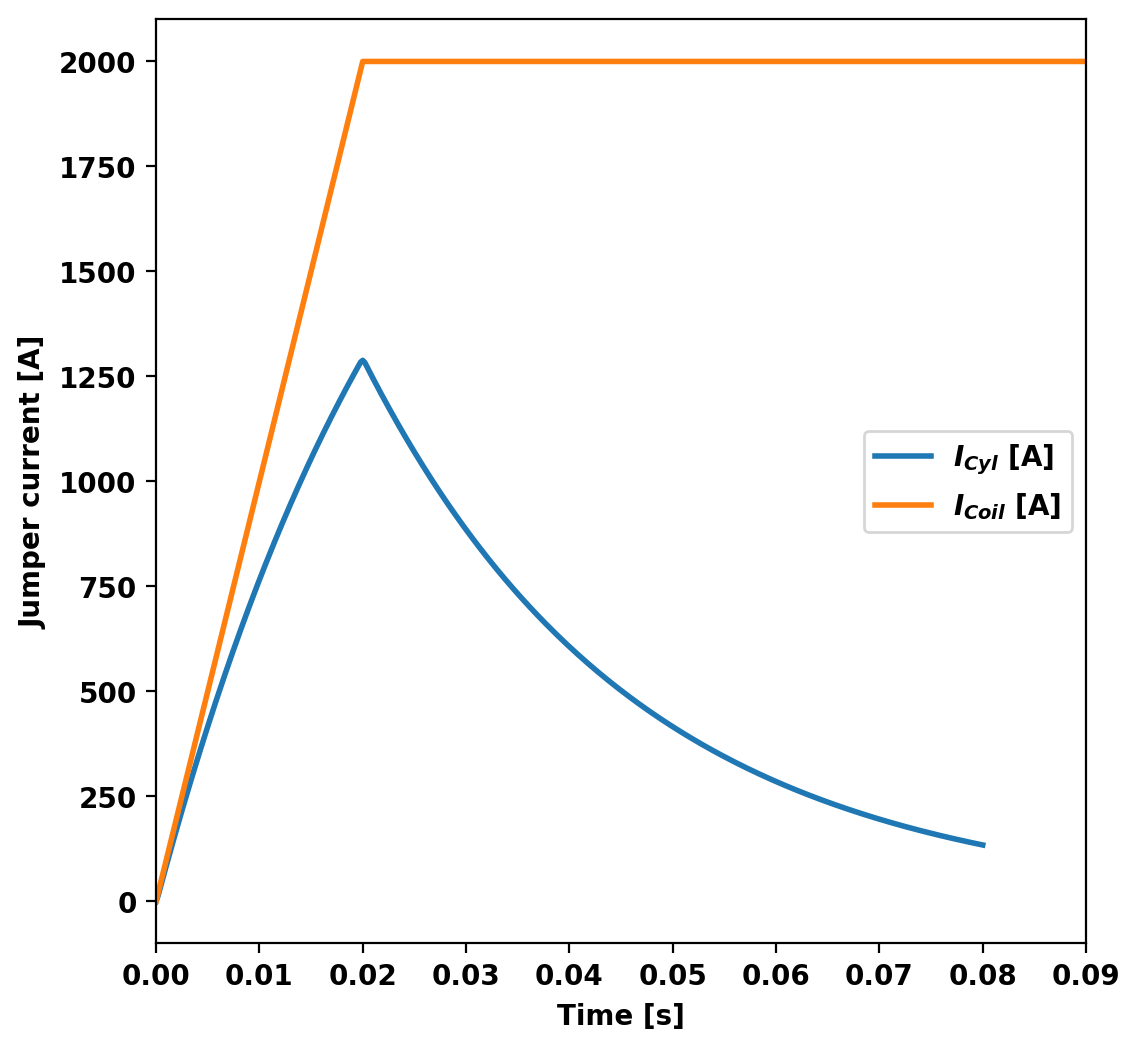
After completing the simulation we can generate plot files using plot_td(). Plot files are saved at a fixed timestep interval, specified by the nplot argument to run_td() with a default value of 10.
Once all fields have been saved for plotting build_XDMF() to generate the XDMF descriptor files for plotting with VisIt of Paraview. This method also returns a XDMF_plot_file object, which can be used to read and interact with plot data in Python (see below).
Post-processing time-domain simulation

Creating output files: oft_xdmf.XXXX.h5
  Removing old Xdmf files
    Removed 43 files
  Found Group: thincurr
    Found Mesh: icoils
    Found Mesh: smesh
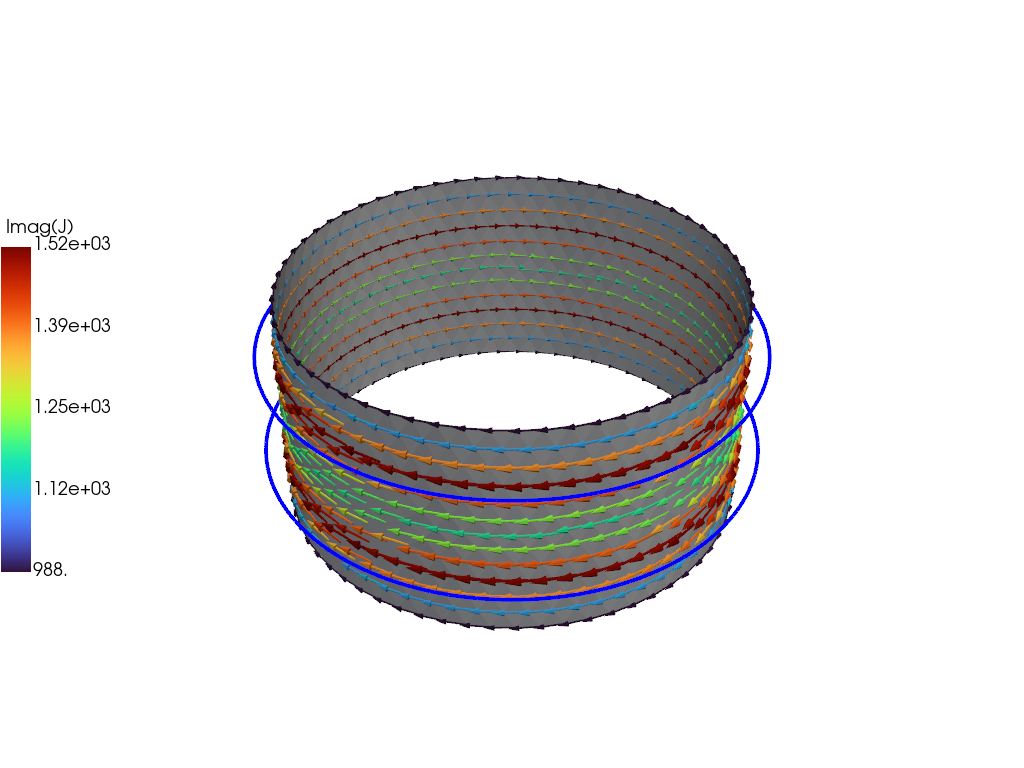
For demonstration purposes we now plot the the solution at the end of the driven phase using pyvista. We now use the plot_data object to generate a 3D plot of the current at t=2.E-2. For more information on the basic steps in this block see ThinCurr Python Example: Compute eigenstates in a plate
 1.17.0